Teamsからのメッセージ受信とメール自動転送
本ページでは、Microsoft Teamsへのメッセージ投稿をロボシュタインで受信し、投稿内容に含まれる「送信先」「件名」「本文」のデータを自動的に抽出(パース)した上で、AWS SESノードを介して指定アドレスへ電子メールを転送するサンプルフローを解説します。
フロー内には、動作確認を単体で完結させるための「Teams疑似カード送信ブロック」も同梱されています。
サンプルフローのインポート
ご利用のロボシュタイン(Node-REDコア)のバージョン環境に合わせて、以下のいずれかのJSONデータをコピーしてインポートを実行してください。
💡 フローのグループ機能について
本フローでは、複数のノードを役割ごとに四角い枠で囲んで視覚的に整理できる「グループ機能」を採用しています。フローが大規模になった際、どのブロックが何の処理をしているのかが一目で判別できるようになり、開発やメンテナンスの効率が向上します。
① グループ機能対応版(v1.3以降向け)
ノード群が枠で囲まれた状態でインポートされます。インポート時に型認識エラー(TypeError)が出る場合は、下の「② 標準版」のデータをお使いください。
サンプルフローのJSONコードを展開する
[
{
"id": "d45bc0394187c9f8",
"type": "group",
"z": "52fe2f99252d9211",
"style": {
"stroke": "#999999",
"stroke-opacity": "1",
"fill": "none",
"fill-opacity": "1",
"label": true,
"label-position": "nw",
"color": "#a4a4a4"
},
"nodes": [
"a3e60407bbbd1f29",
"b29087452bdecded",
"259a8fecb4f1b03e",
"b327e89cf3262936",
"abbecf720e1d5856",
"de1c8a10d89077b2",
"17e25d85196a4ddb",
"ed4dd324ca085bbe",
"1e80fe7db44c3387",
"06fb3aab01149059",
"366cc26b84e3fc52",
"847985d0231e2b57"
],
"x": 94,
"y": 439,
"w": 1050,
"h": 242
},
{
"id": "17e25d85196a4ddb",
"type": "teams-outgoing",
"z": "52fe2f99252d9211",
"g": "d45bc0394187c9f8",
"name": "Teamsメッセージ受信",
"url": "",
"securityToken": "",
"notRespond": false,
"resText": "OK",
"x": 220,
"y": 520,
"wires": [
[
"1e80fe7db44c3387"
]
]
},
{
"id": "1e80fe7db44c3387",
"type": "function",
"z": "52fe2f99252d9211",
"g": "d45bc0394187c9f8",
"name": "メッセージ抽出・パース",
"func": "let html = msg.payload.text;\n\nconst decodeEntities = (str) => {\n const entities = {\n '<': '<',\n '>': '>',\n '&': '&',\n '"': '\"',\n ' ': ' ',\n ''': \"'\"\n };\n return str.replace(/(<|>|&|"| |')/g, (match) => entities[match]);\n};\n\nlet receivedText = html.replace(/<[^>]*>/g, \"\");\nreceivedText = decodeEntities(receivedText);\nreceivedText = receivedText.trim();\n\nmsg.receivedText = receivedText;\nmsg.address = receivedText.match(/【送信先】\\s*([\\s\\S]*)【件名】/)[1];\nmsg.subject = receivedText.match(/【件名】\\s*([\\s\\S]*)【本文】/)[1];\nmsg.text = receivedText.match(/【本文】\\s*([\\s\\S]*)/)[1];\n\nreturn msg;",
"outputs": 1,
"timeout": 0,
"noerr": 0,
"initialize": "",
"finalize": "",
"libs": [],
"x": 480,
"y": 520,
"wires": [
[
"366cc26b84e3fc52"
]
]
},
{
"id": "366cc26b84e3fc52",
"type": "awsses-send",
"z": "52fe2f99252d9211",
"g": "d45bc0394187c9f8",
"name": "AWS SESメール送信",
"from": "demo0001@robodemo.stg-robostein.io",
"to": "address",
"toType": "msg",
"detailSettings": false,
"cc": "",
"ccType": "str",
"bcc": "",
"bccType": "str",
"inReplyTo": "",
"inReplyToType": "str",
"replyTo": "",
"replyToType": "str",
"references": "",
"referencesType": "str",
"subject": "subject",
"subjectType": "msg",
"format": "text",
"body": "text",
"bodyType": "msg",
"files": [],
"x": 740,
"y": 520,
"wires": [
[
"ed4dd324ca085bbe"
]
]
},
{
"id": "ed4dd324ca085bbe",
"type": "debug",
"z": "52fe2f99252d9211",
"g": "d45bc0394187c9f8",
"name": "デバッグ",
"active": true,
"tosidebar": true,
"console": false,
"tostatus": false,
"complete": "true",
"targetType": "full",
"statusVal": "",
"statusType": "auto",
"x": 1000,
"y": 520,
"wires": []
},
{
"id": "259a8fecb4f1b03e",
"type": "inject",
"z": "52fe2f99252d9211",
"g": "d45bc0394187c9f8",
"name": "テストメール送信",
"props": [],
"repeat": "",
"crontab": "",
"once": false,
"onceDelay": 0.1,
"topic": "",
"x": 190,
"y": 580,
"wires": [
[
"06fb3aab01149059"
]
]
},
{
"id": "06fb3aab01149059",
"type": "template",
"z": "52fe2f99252d9211",
"g": "d45bc0394187c9f8",
"name": "送信先",
"field": "connect_address",
"fieldType": "msg",
"format": "handlebars",
"syntax": "mustache",
"template": "sample@example.com",
"output": "str",
"x": 390,
"y": 580,
"wires": [
[
"de1c8a10d89077b2"
]
]
},
{
"id": "de1c8a10d89077b2",
"type": "template",
"z": "52fe2f99252d9211",
"g": "d45bc0394187c9f8",
"name": "件名",
"field": "subject",
"fieldType": "msg",
"format": "handlebars",
"syntax": "mustache",
"template": "Resolved in 7m 32s: Windows: Host has been restarted (uptime < 10m)",
"output": "str",
"x": 590,
"y": 580,
"wires": [
[
"abbecf720e1d5856"
]
]
},
{
"id": "abbecf720e1d5856",
"type": "template",
"z": "52fe2f99252d9211",
"g": "d45bc0394187c9f8",
"name": "本文",
"field": "text",
"fieldType": "msg",
"format": "handlebars",
"syntax": "mustache",
"template": "Problem has been resolved at 12:07:29 on 2026.01.13\nProblem name: Windows: Host has been restarted (uptime < 10m)\nProblem duration: 7m 32s\nHost: Win2025\nSeverity: Warning\nOriginal problem ID: 1790",
"output": "str",
"x": 790,
"y": 580,
"wires": [
[
"b29087452bdecded"
]
]
},
{
"id": "b29087452bdecded",
"type": "function",
"z": "52fe2f99252d9211",
"g": "d45bc0394187c9f8",
"name": "メッセージ設定",
"func": "msg.messageObj = \n{\n \"type\": \"message\",\n \"attachments\": [\n {\n \"contentType\": \"application/vnd.microsoft.card.adaptive\",\n \"content\": {\n \"type\": \"AdaptiveCard\",\n \"body\": [\n {\n \"type\": \"TextBlock\",\n \"text\": \"回線手配の確認\",\n \"weight\": \"Bolder\",\n \"size\": \"Medium\"\n },\n {\n \"type\": \"TextBlock\",\n \"text\": \"【送信先】 \\n\" + msg.connect_address.replace(/\\n/g, \" \\n\"),\n \"wrap\": true\n },\n {\n \"type\": \"TextBlock\",\n \"text\": \"【件名】 \\n\" + msg.subject.replace(/\\n/g, \" \\n\"),\n \"wrap\": true\n },\n {\n \"type\": \"TextBlock\",\n \"text\": \"【本文】 \\n\" + msg.text.replace(/\\n/g, \" \\n\"),\n \"wrap\": true\n }\n ],\n \"msTeams\": {\n \"width\": \"full\"\n },\n \"$schema\": \"[http://adaptivecards.io/schemas/adaptive-card.json](http://adaptivecards.io/schemas/adaptive-card.json)\",\n \"version\": \"1.4\"\n }\n }\n ]\n}\nreturn msg;",
"outputs": 1,
"timeout": 0,
"noerr": 0,
"initialize": "",
"finalize": "",
"libs": [],
"x": 390,
"y": 640,
"wires": [
[
"a3e60407bbbd1f29"
]
]
},
{
"id": "a3e60407bbbd1f29",
"type": "teams-incoming",
"z": "52fe2f99252d9211",
"g": "d45bc0394187c9f8",
"auth": "",
"name": "回線手配確認",
"url": "",
"class": "raw",
"textText": "",
"textTextType": "msg",
"rawBody": "messageObj",
"rawBodyType": "msg",
"showauth": false,
"selectedAuth": "_ADD_",
"selectedClass": "raw",
"x": 650,
"y": 640,
"wires": [
[
"b327e89cf3262936"
]
]
},
{
"id": "b327e89cf3262936",
"type": "debug",
"z": "52fe2f99252d9211",
"g": "d45bc0394187c9f8",
"name": "デバッグ",
"active": true,
"tosidebar": true,
"console": false,
"tostatus": false,
"complete": "payload",
"targetType": "msg",
"statusVal": "",
"statusType": "auto",
"x": 890,
"y": 640,
"wires": []
},
{
"id": "847985d0231e2b57",
"type": "comment",
"z": "52fe2f99252d9211",
"g": "d45bc0394187c9f8",
"name": "Teams受信→メール送信フロー",
"info": "",
"x": 250,
"y": 480,
"wires": []
}
]
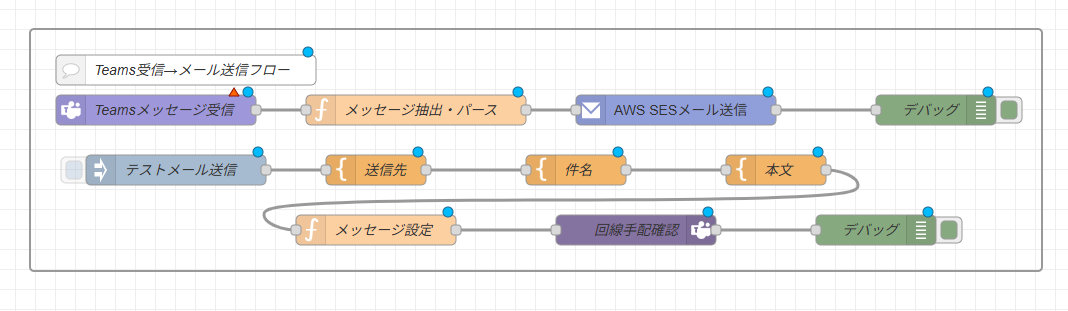
上記をインポートすると、ノード群が枠で囲まれた以下のようなフローが展開されます。
② 標準版(グループ機能非対応環境向け)
ご利用のエージェント環境において、グループ機能読み込みに伴うインポートエラー(TypeError等)を回避したい場合はこちらを使用してください(データは上記のものと変わりません)。
サンプルフローのJSONコードを展開する
[
{
"id": "a3e60407bbbd1f29",
"type": "teams-incoming",
"z": "52fe2f99252d9211",
"auth": "",
"name": "回線手配確認",
"url": "",
"class": "raw",
"textText": "",
"textTextType": "msg",
"rawBody": "messageObj",
"rawBodyType": "msg",
"showauth": false,
"selectedAuth": "_ADD_",
"selectedClass": "raw",
"x": 540,
"y": 640,
"wires": [
[
"b327e89cf3262936"
]
]
},
{
"id": "b29087452bdecded",
"type": "function",
"z": "52fe2f99252d9211",
"name": "メッセージ設定",
"func": "msg.messageObj = \n{\n \"type\": \"message\",\n \"attachments\": [\n {\n \"contentType\": \"application/vnd.microsoft.card.adaptive\",\n \"content\": {\n \"type\": \"AdaptiveCard\",\n \"body\": [\n {\n \"type\": \"TextBlock\",\n \"text\": \"回線手配の確認\",\n \"weight\": \"Bolder\",\n \"size\": \"Medium\"\n },\n {\n \"type\": \"TextBlock\",\n \"text\": \"【送信先】 \\n\" + msg.connect_address.replace(/\\n/g, \" \\n\"),\n \"wrap\": true\n },\n {\n \"type\": \"TextBlock\",\n \"text\": \"【件名】 \\n\" + msg.subject.replace(/\\n/g, \" \\n\"),\n \"wrap\": true\n },\n {\n \"type\": \"TextBlock\",\n \"text\": \"【本文】 \\n\" + msg.text.replace(/\\n/g, \" \\n\"),\n \"wrap\": true\n }\n ],\n \"msTeams\": {\n \"width\": \"full\"\n },\n \"$schema\": \"http://adaptivecards.io/schemas/adaptive-card.json\",\n \"version\": \"1.4\"\n }\n }\n ]\n}\nreturn msg;",
"outputs": 1,
"timeout": 0,
"noerr": 0,
"initialize": "",
"finalize": "",
"libs": [],
"x": 340,
"y": 640,
"wires": [
[
"a3e60407bbbd1f29"
]
]
},
{
"id": "259a8fecb4f1b03e",
"type": "inject",
"z": "52fe2f99252d9211",
"name": "テストメール送信",
"props": [],
"repeat": "",
"crontab": "",
"once": false,
"onceDelay": 0.1,
"topic": "",
"x": 250,
"y": 580,
"wires": [
[
"06fb3aab01149059"
]
]
},
{
"id": "b327e89cf3262936",
"type": "debug",
"z": "52fe2f99252d9211",
"name": "デバッグ",
"active": true,
"tosidebar": true,
"console": false,
"tostatus": false,
"complete": "payload",
"targetType": "msg",
"statusVal": "",
"statusType": "auto",
"x": 720,
"y": 640,
"wires": []
},
{
"id": "abbecf720e1d5856",
"type": "template",
"z": "52fe2f99252d9211",
"name": "本文",
"field": "text",
"fieldType": "msg",
"format": "handlebars",
"syntax": "mustache",
"template": "Problem has been resolved at 12:07:29 on 2026.01.13\nProblem name: Windows: Host has been restarted (uptime < 10m)\nProblem duration: 7m 32s\nHost: Win2025\nSeverity: Warning\nOriginal problem ID: 1790",
"output": "str",
"x": 710,
"y": 580,
"wires": [
[
"b29087452bdecded"
]
]
},
{
"id": "de1c8a10d89077b2",
"type": "template",
"z": "52fe2f99252d9211",
"name": "件名",
"field": "subject",
"fieldType": "msg",
"format": "handlebars",
"syntax": "mustache",
"template": "Resolved in 7m 32s: Windows: Host has been restarted (uptime < 10m)",
"output": "str",
"x": 570,
"y": 580,
"wires": [
[
"abbecf720e1d5856"
]
]
},
{
"id": "17e25d85196a4ddb",
"type": "teams-outgoing",
"z": "52fe2f99252d9211",
"name": "Teamsメッセージ受信",
"url": "",
"securityToken": "",
"notRespond": false,
"resText": "OK",
"x": 220,
"y": 520,
"wires": [
[
"1e80fe7db44c3387"
]
]
},
{
"id": "ed4dd324ca085bbe",
"type": "debug",
"z": "52fe2f99252d9211",
"name": "デバッグ",
"active": true,
"tosidebar": true,
"console": false,
"tostatus": false,
"complete": "true",
"targetType": "full",
"statusVal": "",
"statusType": "auto",
"x": 700,
"y": 520,
"wires": []
},
{
"id": "1e80fe7db44c3387",
"type": "function",
"z": "52fe2f99252d9211",
"name": "メッセージ抽出・パース",
"func": "let html = msg.payload.text;\n\nconst decodeEntities = (str) => {\n const entities = {\n '<': '<',\n '>': '>',\n '&': '&',\n '"': '\"',\n ' ': ' ',\n ''': \"'\"\n };\n return str.replace(/(<|>|&|"| |')/g, (match) => entities[match]);\n};\n\nlet receivedText = html.replace(/<[^>]*>/g, \"\");\nreceivedText = decodeEntities(receivedText);\nreceivedText = receivedText.trim();\n\nmsg.receivedText = receivedText;\nmsg.address = receivedText.match(/【送信先】\\s*([\\s\\S]*)【件名】/)[1];\nmsg.subject = receivedText.match(/【件名】\\s*([\\s\\S]*)【本文】/)[1];\nmsg.text = receivedText.match(/【本文】\\s*([\\s\\S]*)/)[1];\n\nreturn msg;",
"outputs": 1,
"timeout": 0,
"noerr": 0,
"initialize": "",
"finalize": "",
"libs": [],
"x": 370,
"y": 520,
"wires": [
[
"366cc26b84e3fc52"
]
]
},
{
"id": "06fb3aab01149059",
"type": "template",
"z": "52fe2f99252d9211",
"name": "送信先",
"field": "connect_address",
"fieldType": "msg",
"format": "handlebars",
"syntax": "mustache",
"template": "sample@example.com",
"output": "str",
"x": 430,
"y": 580,
"wires": [
[
"de1c8a10d89077b2"
]
]
},
{
"id": "366cc26b84e3fc52",
"type": "awsses-send",
"z": "52fe2f99252d9211",
"name": "AWS SESメール送信",
"from": "demo0001@robodemo.stg-robostein.io",
"to": "address",
"toType": "msg",
"detailSettings": false,
"cc": "",
"ccType": "str",
"bcc": "",
"bccType": "str",
"inReplyTo": "",
"inReplyToType": "str",
"replyTo": "",
"replyToType": "str",
"references": "",
"referencesType": "str",
"subject": "subject",
"subjectType": "msg",
"format": "text",
"body": "text",
"bodyType": "msg",
"files": [],
"x": 530,
"y": 520,
"wires": [
[
"ed4dd324ca085bbe"
]
]
},
{
"id": "847985d0231e2b57",
"type": "comment",
"z": "52fe2f99252d9211",
"name": "Teams受信→メール送信フロー",
"info": "",
"x": 250,
"y": 480,
"wires": []
}
]
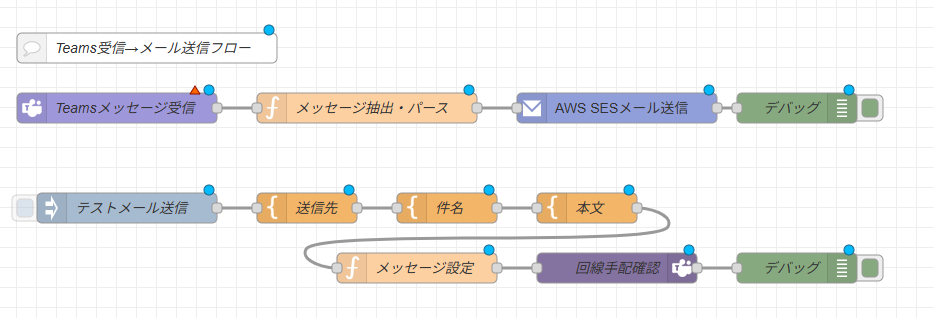
上記をインポートすると、以下のようなフローが展開されます。
フローの構造・ブロック解説
このサンプルフローは、「Teams受信➔メール自動転送」を行う本番運用システムライン(上段)と、開発時の検証や疎通確認をサポートするテストデータ生成・投稿ライン(下段)の2層で設計されています。
1. メール転送処理ブロック(上段)
Teamsへのチャット投稿内容を傍受し、整形してメール送信するメインロジックです。
-
Teamsメッセージ受信(
teams-outgoing) TeamsのOutgoing Webhook等から送信されるHTTPリクエストを待ち受け、メッセージ内容をmsg.payloadに取得します。 -
メッセージ抽出・パース(
functionノード) Teamsから届くHTMLタグ混じりのチャットデータをJavaScriptで加工します。 <[^>]*>(正規表現)を用いてHTMLタグをすべてストリップ(除去)します。<などのHTML実体参照(エンティティ)を元のテキスト文字へとデコードします。-
チャット本文から
【送信先】【件名】【本文】の各マーカーを基準として、正規表現のキャプチャグループ([\s\S]*)でそれぞれの文字列を動的に切り出し、後続ノードへ引き渡します。 -
AWS SESメール送信(
awsses-send) パースした各プロパティ(msg.address,msg.subject,msg.text)を宛先・件名・本文に割り当て、AWS SESを介して外部へメールを即時配信します。
2. テストデータ生成・投稿ブロック(下段)
Teams環境や外部システムとの結合テストを行わずに、ロボシュタイン単体でパース処理の検証ができるブロックです。
- テストメール送信(
inject) テスト用のトリガーボタンです。 - 送信先 / 件名 / 本文(
template) 検証用のアドレスや、Zabbix等の障害通知を模したテストメッセージをHandlebars形式でシミュレート生成します。 - メッセージ設定(
function) Teamsで標準的に使われる「Adaptive Cards(アダプティブ・カード)」のJSON構造体を組み立て、teams-incomingノードを介して対象チャットへのテスト投稿を擬似的にキックします。
🛠️ 設定・書き換えが必要な箇所
インポート完了後、ご自身の環境で動作させるには以下のパラメータを編集してください。
① Webhookおよび接続情報の設定
- Teamsメッセージ受信ノード / 回線手配確認ノード お使いのMicrosoft Teamsのチャット/チャネルに紐づくWebhookの接続エンドポイント、URL、および認証トークン(Secure Token)を各プロパティに適用してください。
② メール送信元の変更
- AWS SESメール送信ノード
「送信元(From)」プロパティに設定されているアドレス(
demo0001@...)を、AWS SES側でドメイン/アドレス認証が完了している実運用の送信元メールアドレスへ変更してください。
💡 技術解説:HTMLタグの除去と文字列パース用JavaScriptコード
フロー内の「メッセージ抽出・パース」ノードでは、Teams特有のマークアップデータをプレーンテキストとして安全に読み替えるため、以下のロジックを実行しています。
// 1. 受信したHTMLデータからテキストのみを取り出し
let receivedText = html.replace(/<[^>]*>/g, "");
// 2. HTML実体参照(< や 等)のデコード処理を経て、テキストをクレンジング
receivedText = decodeEntities(receivedText).trim();
// 3. 正規表現で各特定マーカー間の文字列を安全にスライス
msg.address = receivedText.match(/【送信先】\s*([\s\S]*)【件名】/)[1];
msg.subject = receivedText.match(/【件名】\s*([\s\S]*)【本文】/)[1];
msg.text = receivedText.match(/【本文】\s*([\s\S]*)/)[1];
文字のパースエラーを防ぐためのルール
Teams側から投稿するメッセージは、必ず 【送信先】 【件名】 【本文】 の文言を含め、この順番通りに改行して記述してください。この構成が崩れると、正規表現のキャプチャパターンにマッチせず、エラー(要素の参照不全)の原因となります。