SQLiteによるデータベース基本操作
SQLiteノードを使用した、データベースの作成からテーブル管理、およびレコードの登録(INSERT)・参照(SELECT)・更新(UPDATE)・削除(DELETE)を行う基本操作(CRUD)のサンプルフローです。
メール受信情報や実行ログデータなど、処理結果を一時的・長期的に保存・管理したい場合のベースとしてご活用いただけます。
サンプルフロー(SQLite基本動作確認)
以下の「サンプルフローのJSONコードを展開する」をクリックし、中のJSONデータをコピーしてロボシュタインのメニューから「インポート」を実行してください。
サンプルフローのJSONコードを展開する
[
{
"id": "64aa02184d1f1781",
"type": "tab",
"label": "sqlite操作サンプルフロー",
"disabled": false,
"info": "",
"env": []
},
{
"id": "21ccc5cac64bf0d8",
"type": "sqlite",
"z": "64aa02184d1f1781",
"mydb": "3db9a56f.d9106a",
"sqlquery": "fixed",
"sql": "create table if not exists checkMailDataTable (\n id text primary key,\n mailData TEXT,\n compFlg INTEGER\n);",
"name": "テーブル作成",
"x": 520,
"y": 160,
"wires": [
[
"cf872c2d04a2155f"
]
]
},
{
"id": "8da71ccc9d7842de",
"type": "inject",
"z": "64aa02184d1f1781",
"name": "",
"repeat": "",
"crontab": "",
"once": false,
"onceDelay": 0.1,
"topic": "",
"payload": "",
"payloadType": "date",
"x": 180,
"y": 160,
"wires": [
[
"21ccc5cac64bf0d8"
]
]
},
{
"id": "cf872c2d04a2155f",
"type": "debug",
"z": "64aa02184d1f1781",
"name": "",
"active": true,
"tosidebar": true,
"console": false,
"tostatus": false,
"complete": "true",
"targetType": "full",
"x": 670,
"y": 160,
"wires": []
},
{
"id": "d1756618e3394606",
"type": "comment",
"z": "64aa02184d1f1781",
"name": "データベースは「/data/sqlite-xxxxx」のパスで利用してください。(xxxxxは任意の文字列)",
"info": "",
"x": 380,
"y": 120,
"wires": []
},
{
"id": "f0a55948e43b713a",
"type": "inject",
"z": "64aa02184d1f1781",
"name": "",
"props": [
{
"p": "payload"
},
{
"p": "topic",
"vt": "str"
}
],
"repeat": "",
"crontab": "",
"once": false,
"onceDelay": 0.1,
"topic": "",
"payload": "",
"payloadType": "date",
"x": 180,
"y": 220,
"wires": [
[
"3b381c02940b12c4"
]
]
},
{
"id": "3b381c02940b12c4",
"type": "function",
"z": "64aa02184d1f1781",
"name": "SQL構文",
"func": "msg.topic = \"select * from sqlite_master where type='table' order by name\";\nreturn msg;",
"outputs": 1,
"timeout": "",
"noerr": 0,
"initialize": "",
"finalize": "",
"libs": [],
"x": 360,
"y": 220,
"wires": [
[
"0a9d048c2f9d7918"
]
]
},
{
"id": "0a9d048c2f9d7918",
"type": "sqlite",
"z": "64aa02184d1f1781",
"mydb": "3db9a56f.d9106a",
"sqlquery": "msg.topic",
"sql": "tables",
"name": "デーブルリスト",
"x": 520,
"y": 220,
"wires": [
[
"28c7d2282269e423"
]
]
},
{
"id": "28c7d2282269e423",
"type": "debug",
"z": "64aa02184d1f1781",
"name": "",
"active": true,
"tosidebar": true,
"console": false,
"tostatus": false,
"complete": "true",
"targetType": "full",
"x": 670,
"y": 220,
"wires": []
},
{
"id": "9327468354a443ac",
"type": "function",
"z": "64aa02184d1f1781",
"name": "SQL構文",
"func": "const date = new Date();\nconst datestr = date.toISOString().replace(/[^0-9]/g, '').slice(0, -5);\n// レコードに保存する際の一意のキー\nconst key = date.getTime().toString();\n\n// 保存するオブジェクト\nmsg.payload = JSON.stringify({subject: 'subject1',text: 'text1'});\n\nmsg.topic = `insert into checkMailDataTable `;\nmsg.topic += `(id, mailData, compFlg) `;\nmsg.topic += `values ('${key}','${msg.payload}',0);`;\nreturn msg;",
"outputs": 1,
"timeout": "",
"noerr": 0,
"initialize": "",
"finalize": "",
"libs": [],
"x": 360,
"y": 280,
"wires": [
[
"d3b0e349b005a9cf"
]
]
},
{
"id": "d3b0e349b005a9cf",
"type": "sqlite",
"z": "64aa02184d1f1781",
"mydb": "3db9a56f.d9106a",
"sqlquery": "msg.topic",
"sql": "",
"name": "データ追加①",
"x": 520,
"y": 280,
"wires": [
[
"4feb01fd7c8bc68e"
]
]
},
{
"id": "d90d6b7b14a9a522",
"type": "inject",
"z": "64aa02184d1f1781",
"name": "",
"repeat": "",
"crontab": "",
"once": false,
"onceDelay": 0.1,
"topic": "",
"payload": "",
"payloadType": "date",
"x": 180,
"y": 280,
"wires": [
[
"9327468354a443ac"
]
]
},
{
"id": "4feb01fd7c8bc68e",
"type": "debug",
"z": "64aa02184d1f1781",
"name": "",
"active": true,
"tosidebar": true,
"console": false,
"tostatus": false,
"complete": "true",
"targetType": "full",
"x": 670,
"y": 280,
"wires": []
},
{
"id": "860e1eb421342020",
"type": "sqlite",
"z": "64aa02184d1f1781",
"mydb": "3db9a56f.d9106a",
"sqlquery": "fixed",
"sql": "select * from checkMailDataTable;",
"name": "データ参照",
"x": 510,
"y": 460,
"wires": [
[
"6cd00053ecaf493a"
]
]
},
{
"id": "f716ee63934ccf8b",
"type": "inject",
"z": "64aa02184d1f1781",
"name": "",
"repeat": "",
"crontab": "",
"once": false,
"onceDelay": 0.1,
"topic": "",
"payload": "",
"payloadType": "date",
"x": 180,
"y": 460,
"wires": [
[
"860e1eb421342020"
]
]
},
{
"id": "6cd00053ecaf493a",
"type": "debug",
"z": "64aa02184d1f1781",
"name": "",
"active": true,
"tosidebar": true,
"console": false,
"tostatus": false,
"complete": "true",
"targetType": "full",
"x": 670,
"y": 460,
"wires": []
},
{
"id": "1014d9bf007ee9e5",
"type": "debug",
"z": "64aa02184d1f1781",
"name": "",
"active": true,
"tosidebar": true,
"console": false,
"tostatus": false,
"complete": "true",
"targetType": "full",
"x": 670,
"y": 520,
"wires": []
},
{
"id": "30429da8a15dc135",
"type": "sqlite",
"z": "64aa02184d1f1781",
"mydb": "3db9a56f.d9106a",
"sqlquery": "msg.topic",
"sql": "",
"name": "データ更新",
"x": 510,
"y": 520,
"wires": [
[
"1014d9bf007ee9e5"
]
]
},
{
"id": "ae28c1cc107853d3",
"type": "function",
"z": "64aa02184d1f1781",
"name": "SQL構文",
"func": "msg.topic = \"update checkMailDataTable \";\nmsg.topic += \"set output = 'C' \";\nmsg.topic += \"where mid = 'ここに任意のmidを入れてください';\";\n// 例msg.topic += \"where mid = '123456';\";\nreturn msg;",
"outputs": 1,
"timeout": "",
"noerr": 0,
"initialize": "",
"finalize": "",
"libs": [],
"x": 360,
"y": 520,
"wires": [
[
"30429da8a15dc135"
]
]
},
{
"id": "d99dde041c0ce6ce",
"type": "inject",
"z": "64aa02184d1f1781",
"name": "",
"repeat": "",
"crontab": "",
"once": false,
"onceDelay": 0.1,
"topic": "",
"payload": "",
"payloadType": "date",
"x": 180,
"y": 520,
"wires": [
[
"ae28c1cc107853d3"
]
]
},
{
"id": "82be984abfded986",
"type": "sqlite",
"z": "64aa02184d1f1781",
"mydb": "3db9a56f.d9106a",
"sqlquery": "msg.topic",
"sql": "",
"name": "データ削除",
"x": 510,
"y": 580,
"wires": [
[
"a9bd74b565724602"
]
]
},
{
"id": "a9bd74b565724602",
"type": "debug",
"z": "64aa02184d1f1781",
"name": "",
"active": true,
"tosidebar": true,
"console": false,
"tostatus": false,
"complete": "true",
"targetType": "full",
"x": 670,
"y": 580,
"wires": []
},
{
"id": "10f6ad9167eb5e19",
"type": "function",
"z": "64aa02184d1f1781",
"name": "SQL構文",
"func": "msg.topic = \"delete from checkMailDataTable \";\nmsg.topic += \"where mid = 'ここに任意のmidを入れてください';\";\n// 例msg.topic += \"where mid = '123456';\";\nreturn msg;",
"outputs": 1,
"timeout": "",
"noerr": 0,
"initialize": "",
"finalize": "",
"libs": [],
"x": 360,
"y": 580,
"wires": [
[
"82be984abfded986"
]
]
},
{
"id": "e946e321cffc4d7f",
"type": "sqlite",
"z": "64aa02184d1f1781",
"mydb": "3db9a56f.d9106a",
"sqlquery": "msg.topic",
"sql": "",
"name": "テーブル削除",
"x": 520,
"y": 640,
"wires": [
[
"d12ec6c0552ae4ef"
]
]
},
{
"id": "d12ec6c0552ae4ef",
"type": "debug",
"z": "64aa02184d1f1781",
"name": "",
"active": true,
"tosidebar": true,
"console": false,
"tostatus": false,
"complete": "true",
"targetType": "full",
"x": 670,
"y": 640,
"wires": []
},
{
"id": "5f24a5bc82373e92",
"type": "function",
"z": "64aa02184d1f1781",
"name": "SQL構文",
"func": "msg.topic = \"drop table checkMailDataTable;\";\nreturn msg;",
"outputs": 1,
"timeout": "",
"noerr": 0,
"initialize": "",
"finalize": "",
"libs": [],
"x": 360,
"y": 640,
"wires": [
[
"e946e321cffc4d7f"
]
]
},
{
"id": "bf47330a51c694f1",
"type": "inject",
"z": "64aa02184d1f1781",
"name": "",
"repeat": "",
"crontab": "",
"once": false,
"onceDelay": 0.1,
"topic": "",
"payload": "",
"payloadType": "date",
"x": 180,
"y": 640,
"wires": [
[
"5f24a5bc82373e92"
]
]
},
{
"id": "a91cb75e12cc089a",
"type": "inject",
"z": "64aa02184d1f1781",
"name": "",
"repeat": "",
"crontab": "",
"once": false,
"onceDelay": 0.1,
"topic": "",
"payload": "",
"payloadType": "date",
"x": 180,
"y": 580,
"wires": [
[
"10f6ad9167eb5e19"
]
]
},
{
"id": "7f4c4a6ee574ca3e",
"type": "comment",
"z": "64aa02184d1f1781",
"name": "sqlite 基本操作サンプル",
"info": "",
"x": 160,
"y": 80,
"wires": []
},
{
"id": "6e9dcd7a3f31d620",
"type": "comment",
"z": "64aa02184d1f1781",
"name": "テーブルを作成できます(まずこちらをしないとDBは使えません)",
"info": "",
"x": 1000,
"y": 160,
"wires": []
},
{
"id": "0bd7db4cb3f2d028",
"type": "comment",
"z": "64aa02184d1f1781",
"name": "テーブル一覧が見れます",
"info": "",
"x": 870,
"y": 220,
"wires": []
},
{
"id": "a2bd0a0839e0b82c",
"type": "comment",
"z": "64aa02184d1f1781",
"name": "データが追加できます。",
"info": "",
"x": 870,
"y": 280,
"wires": []
},
{
"id": "35eee2d3d1b3d215",
"type": "comment",
"z": "64aa02184d1f1781",
"name": "追加したデータを参照できます。",
"info": "",
"x": 890,
"y": 460,
"wires": []
},
{
"id": "aceb38694fe7d29b",
"type": "comment",
"z": "64aa02184d1f1781",
"name": "特定のデータを更新する際に使えます(このままじゃ使えない)",
"info": "",
"x": 990,
"y": 520,
"wires": []
},
{
"id": "8fe7c2f1bd3b20eb",
"type": "comment",
"z": "64aa02184d1f1781",
"name": "特定のデータを削除する際に使えます(このままじゃ使えない)",
"info": "",
"x": 990,
"y": 580,
"wires": []
},
{
"id": "1154812cda17e75a",
"type": "comment",
"z": "64aa02184d1f1781",
"name": "テーブルを削除できます。",
"info": "",
"x": 870,
"y": 640,
"wires": []
},
{
"id": "877b91f6bd7a48ec",
"type": "sqlite",
"z": "64aa02184d1f1781",
"mydb": "3db9a56f.d9106a",
"sqlquery": "msg.topic",
"sql": "",
"name": "データ追加②",
"x": 520,
"y": 340,
"wires": [
[
"f91c0b82db29d4d3"
]
]
},
{
"id": "35553c8d4bd2d7c2",
"type": "inject",
"z": "64aa02184d1f1781",
"name": "",
"repeat": "",
"crontab": "",
"once": false,
"onceDelay": 0.1,
"topic": "",
"payload": "",
"payloadType": "date",
"x": 180,
"y": 340,
"wires": [
[
"7b0f06b0f2a0d176"
]
]
},
{
"id": "f91c0b82db29d4d3",
"type": "debug",
"z": "64aa02184d1f1781",
"name": "",
"active": true,
"tosidebar": true,
"console": false,
"tostatus": false,
"complete": "true",
"targetType": "full",
"x": 670,
"y": 340,
"wires": []
},
{
"id": "2932852d5af716d9",
"type": "comment",
"z": "64aa02184d1f1781",
"name": "データが追加できます。",
"info": "",
"x": 870,
"y": 340,
"wires": []
},
{
"id": "e97a185ee1ca2583",
"type": "sqlite",
"z": "64aa02184d1f1781",
"mydb": "3db9a56f.d9106a",
"sqlquery": "msg.topic",
"sql": "",
"name": "データ追加③",
"x": 520,
"y": 400,
"wires": [
[
"b1aa7276204270b6"
]
]
},
{
"id": "891d711a7c0970a6",
"type": "inject",
"z": "64aa02184d1f1781",
"name": "",
"repeat": "",
"crontab": "",
"once": false,
"onceDelay": 0.1,
"topic": "",
"payload": "",
"payloadType": "date",
"x": 180,
"y": 400,
"wires": [
[
"7ee79079444b2e83"
]
]
},
{
"id": "b1aa7276204270b6",
"type": "debug",
"z": "64aa02184d1f1781",
"name": "",
"active": true,
"tosidebar": true,
"console": false,
"tostatus": false,
"complete": "true",
"targetType": "full",
"x": 670,
"y": 400,
"wires": []
},
{
"id": "961366b875718479",
"type": "comment",
"z": "64aa02184d1f1781",
"name": "データが追加できます。",
"info": "",
"x": 870,
"y": 400,
"wires": []
},
{
"id": "7b0f06b0f2a0d176",
"type": "function",
"z": "64aa02184d1f1781",
"name": "SQL構文",
"func": "const date = new Date();\nconst datestr = date.toISOString().replace(/[^0-9]/g, '').slice(0, -5);\n// レコードに保存する際の一意のキー\nconst key = date.getTime().toString();\n\n// 保存するオブジェクト\nmsg.payload = JSON.stringify({subject: 'subject2',text: 'text2'});\n\nmsg.topic = `insert into checkMailDataTable `;\nmsg.topic += `(id, mailData, compFlg) `;\nmsg.topic += `values ('${key}','${msg.payload}',0);`;\nreturn msg;",
"outputs": 1,
"timeout": "",
"noerr": 0,
"initialize": "",
"finalize": "",
"libs": [],
"x": 360,
"y": 340,
"wires": [
[
"877b91f6bd7a48ec"
]
]
},
{
"id": "7ee79079444b2e83",
"type": "function",
"z": "64aa02184d1f1781",
"name": "SQL構文",
"func": "const date = new Date();\nconst datestr = date.toISOString().replace(/[^0-9]/g, '').slice(0, -5);\n// レコードに保存する際の一意のキー\nconst key = date.getTime().toString();\n\n// 保存するオブジェクト\nmsg.payload = JSON.stringify({subject: 'subject3',text: 'text3'});\n\nmsg.topic = `insert into checkMailDataTable `;\nmsg.topic += `(id, mailData, compFlg) `;\nmsg.topic += `values ('${key}','${msg.payload}',0);`;\nreturn msg;",
"outputs": 1,
"timeout": "",
"noerr": 0,
"initialize": "",
"finalize": "",
"libs": [],
"x": 360,
"y": 400,
"wires": [
[
"e97a185ee1ca2583"
]
]
},
{
"id": "3db9a56f.d9106a",
"type": "sqlitedb",
"db": "/data/sqlite-sample",
"mode": "RWC"
}
]
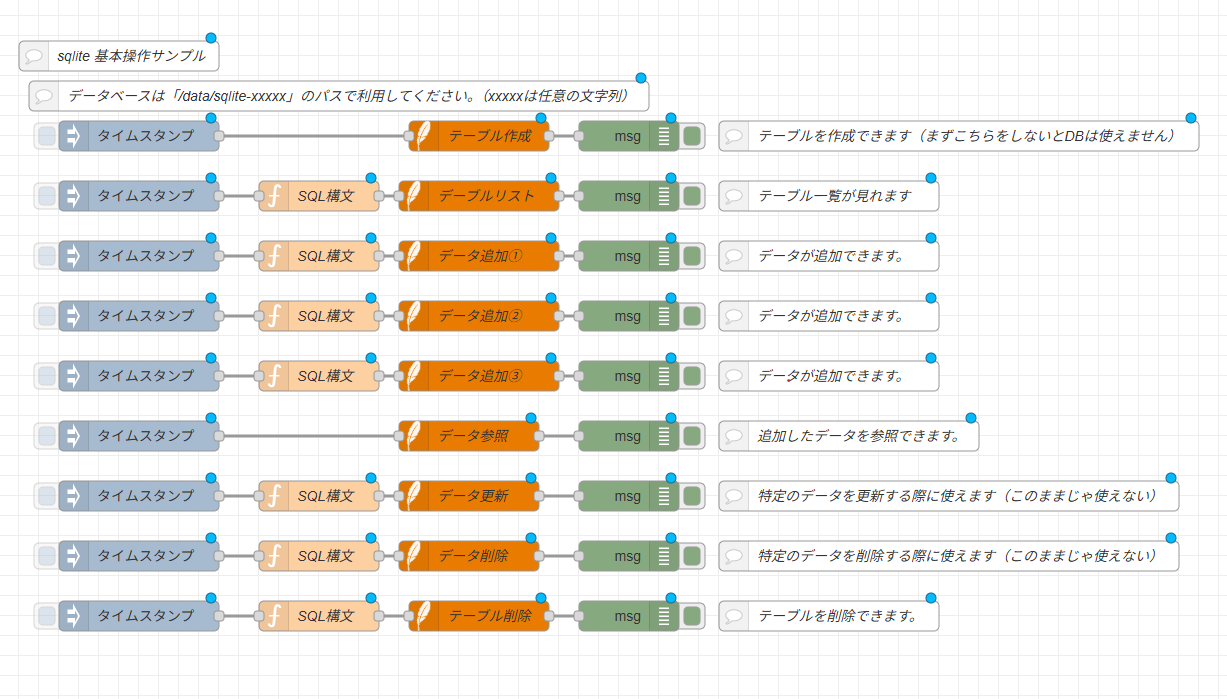
上記をインポートすると、以下のようなフローが展開されます。
フローの概要
標準のSQLiteノードを利用し、データベースの作成からテーブル管理、データ挿入・参照・更新・削除・テーブル削除までの一連のSQL操作を実行します。
| ステップ | 使用ノード | 処理内容 |
|---|---|---|
| ① テーブル作成 | sqliteノード | CREATE TABLE IF NOT EXISTS コマンドを実行し、checkMailDataTable テーブルを新規作成します。 |
| ② テーブル一覧表示 | function ➔ sqliteノード | sqlite_master システムテーブルを参照し、DB内に存在するテーブルの一覧を取得します。 |
| ③ データ追加(①〜③) | function ➔ sqliteノード | Date.getTime() で生成したタイムスタンプをキーにして、メール情報のJSONデータを追加します。 |
| ④ データ参照 | sqliteノード | SELECT * コマンドを実行し、保存されている全レコードを取得してデバッグタブへ出力します。 |
| ⑤ データ更新 | function ➔ sqliteノード | UPDATE コマンドを発行し、指定したキーのレコードの特定項目を上書き書き換えします。 |
| ⑥ データ削除 | function ➔ sqliteノード | DELETE コマンドを発行し、指定したキーに一致する特定レコードを削除します。 |
| ⑦ テーブル削除 | function ➔ sqliteノード | DROP TABLE コマンドを発行し、テーブル構造および保持するデータを完全に削除します。 |
使用している主要ノードの技術解説
本フローの制御には、以下のノードの仕組みを利用しています。
- SQLiteの接続・SQL実行処理: node-red-node-sqlite (Node-RED Library)
- SQL構文の組み立て処理: Functionノード(JavaScriptを使用して
msg.topicにSQL文字列を格納します)
設置後の設定
「SQLiteノード(DB接続設定)」の設定
フロー内の任意の 「SQLiteノード」 のプロパティを開き、鉛筆マークをクリックしてデータベースのパラメータを指定してください。
| 項目名 | 設定内容 |
|---|---|
| データベース | 【必須】 データベースの保存先パスを指定します。ロボシュタイン環境下では /data/sqlite-sample のように /data/sqlite-xxxxx の形式で入力してください。 |
| モード | データベースのアクセスモードを選択します。通常は 読み取り-書き込み-作成 を選択します。 |
DBパスの指定に関する注意点
データベースファイルのパスは、必ず /data/ ディレクトリ直下の指定ルール(/data/sqlite-xxxxx)に従って入力してください。その他の不適切なパスを指定した場合、ファイル書き込み権限エラーが発生する可能性があります。
💡 応用:SQLiteで操作するテーブル構成とSQL構文Tips
本サンプルフローで操作している checkMailDataTable テーブルの構成と、実務で応用可能な基本SQL文の解説です。
1. サンプルのテーブル構造(スキーマ)
| カラム名 | データ型 | 制約 | 説明 |
|---|---|---|---|
| id | TEXT | PRIMARY KEY | 主キー(一意の識別ID。サンプルではタイムスタンプ文字列) |
| mailData | TEXT | - | 保存する任意のデータ(JSON文字列など) |
| compFlg | INTEGER | - | 処理ステータスフラグ(0: 未処理, 1: 処理完了 など) |
2. サンプルFunctionノード内のカスタマイズ
サンプルフロー内の「データ更新」および「データ削除」のFunctionノードには、初期状態で仮の条件式(WHERE mid = '...')が記述されています。
実際にご利用の際は、以下のようにキー列である id を指定する形に条件式を修正してご利用ください。
🔹 特定レコードの更新(UPDATE)
指定したIDのレコードの処理フラグ(compFlg)を 1 に書き換える例です。
msg.topic  = "UPDATE checkMailDataTable ";
msg.topic += "SET compFlg = 1 ";
msg.topic += "WHERE id = '1718000000000';";
return msg;
🔹 特定レコードの削除(DELETE)
指定したIDのレコードをテーブルから削除する例です。
msg.topic  = "DELETE FROM checkMailDataTable ";
msg.topic += "WHERE id = '1718000000000';";
return msg;
設置後の設定
「SQLiteノード(SQLクエリ選択)」の設定
フロー内の各 「SQLiteノード」 の編集画面で、SQLの発行方法をパラメータで指定します。
| 項目名 | 設定内容 |
|---|---|
| SQLクエリ | 固定のSQL文を実行する場合は 固定文 を選択し、下の「SQL文」枠に直接SQLを入力します。Functionノード等から渡された動的なSQL文を実行する場合は msg.topic経由(または msg.topic)を選択します。 |
| SQL文 | 「SQLクエリ」で 固定文 を選択した場合に、直接実行したいSQL構文(CREATE TABLE ... や SELECT * FROM ... など)を入力します。 |
実行結果の確認(デバッグ)
「テーブル作成」を実行した上で「データ追加①」などのInjectボタンを押下し、その後「データ参照」を実行すると、画面右側のデバッグタブに以下のようにデータベースから参照されたオブジェクト(配列データ)が出力されます。
[
    {
        "id": "1718000000000",
        "mailData": "{\"subject\":\"subject1\",\"text\":\"text1\"}",
        "compFlg": 0
    }
]