ChromeDriverによるブラウザ自動制御(Selenium不要)
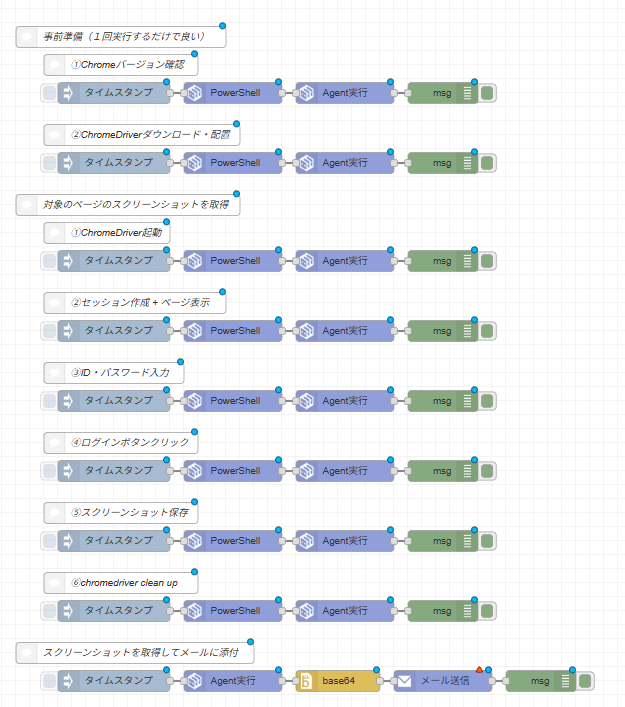
本ページでは、Seleniumなどの外部ライブラリを使用せず、ChromeDriverのHTTP APIを直接操作して、ブラウザ起動、Webサイト(ロボシュタインログイン画面)への自動入力・ログイン、スクリーンショットの取得、そしてメール添付送信までを自動化するサンプルフローを解説します。
特に、RSエージェント(32bit PowerShell)環境下で発生しやすい構文エラーやタイムアウト制約をクリアするための「実戦的な記述ルール」を網羅しています。
サンプルフローのインポート
以下の「サンプルフローのJSONコードを展開する」をクリックし、中のJSONデータをコピーしてロボシュタインのメニューから「インポート」を実行してください。
サンプルフローのJSONコードを展開する
[
{
"id": "0fd68e518913ca4e",
"type": "tab",
"label": "ChromeDriver自動ログイン・スクショメール送信",
"disabled": false,
"info": "",
"env": []
},
{
"id": "a5badb8f925b5654",
"type": "comment",
"z": "0fd68e518913ca4e",
"name": "⑥chromedriver clean up",
"info": "",
"x": 190,
"y": 860,
"wires": []
},
{
"id": "9618347f6403a535",
"type": "clagent-psbuild",
"z": "0fd68e518913ca4e",
"name": "",
"scripts": "Stop-Process -Name \"chromedriver\" -Force -ErrorAction SilentlyContinue\nStart-Sleep -Seconds 2\nWrite-Output \"cleanup done\"",
"scriptsout": "ps",
"scriptsoutType": "msg",
"append": false,
"x": 350,
"y": 900,
"wires": [
[
"7be11c9a67a5da1f"
]
]
},
{
"id": "7be11c9a67a5da1f",
"type": "clagent-run",
"z": "0fd68e518913ca4e",
"name": "",
"command": "exec",
"listout": "",
"listoutType": "msg",
"statout": "",
"statoutType": "msg",
"getfilename": "C:\\\\Users\\\\kawashima\\\\Desktop\\\\Swagger.txt",
"getfilenameType": "str",
"getfileout": "payload",
"getfileoutType": "msg",
"getfilebytes": false,
"putfilein": "",
"putfileinType": "bin",
"putfilename": "",
"putfilenameType": "str",
"putfileout": "",
"putfileoutType": "msg",
"execps": "ps",
"execpsType": "msg",
"execout": "payload",
"execoutType": "msg",
"execonconsole": true,
"rpaproduct": "",
"rpaproductType": "str",
"rpaout": "",
"rpaoutType": "msg",
"target": "",
"targetType": "str",
"x": 510,
"y": 900,
"wires": [
[
"51748faac5e29812"
]
]
},
{
"id": "51748faac5e29812",
"type": "debug",
"z": "0fd68e518913ca4e",
"name": "",
"active": true,
"tosidebar": true,
"console": false,
"tostatus": false,
"complete": "true",
"targetType": "full",
"x": 650,
"y": 900,
"wires": []
},
{
"id": "737a64e68dc96182",
"type": "inject",
"z": "0fd68e518913ca4e",
"name": "",
"repeat": "",
"crontab": "",
"once": false,
"onceDelay": 0.1,
"topic": "",
"payload": "",
"payloadType": "date",
"x": 180,
"y": 900,
"wires": [
[
"9618347f6403a535"
]
]
},
{
"id": "6ef2f224f9ec9728",
"type": "comment",
"z": "0fd68e518913ca4e",
"name": "①Chromeバージョン確認",
"info": "",
"x": 190,
"y": 120,
"wires": []
},
{
"id": "4d24d223e0efcef1",
"type": "clagent-psbuild",
"z": "0fd68e518913ca4e",
"name": "",
"scripts": "(Get-Item \"C:\\\\Program Files\\\\Google\\\\Chrome\\\\Application\\\\chrome.exe\").VersionInfo.FileVersion",
"scriptsout": "ps",
"scriptsoutType": "msg",
"append": false,
"x": 350,
"y": 160,
"wires": [
[
"3659f2111d369cf0"
]
]
},
{
"id": "3659f2111d369cf0",
"type": "clagent-run",
"z": "0fd68e518913ca4e",
"name": "",
"command": "exec",
"listout": "",
"listoutType": "msg",
"statout": "",
"statoutType": "msg",
"getfilename": "C:\\\\Users\\\\kawashima\\\\Desktop\\\\Swagger.txt",
"getfilenameType": "str",
"getfileout": "payload",
"getfileoutType": "msg",
"getfilebytes": false,
"putfilein": "",
"putfileinType": "bin",
"putfilename": "",
"putfilenameType": "str",
"putfileout": "",
"putfileoutType": "msg",
"execps": "ps",
"execpsType": "msg",
"execout": "payload",
"execoutType": "msg",
"execonconsole": true,
"rpaproduct": "",
"rpaproductType": "str",
"rpaout": "",
"rpaoutType": "msg",
"target": "",
"targetType": "str",
"x": 510,
"y": 160,
"wires": [
[
"988a97cb6b0c3c8b"
]
]
},
{
"id": "988a97cb6b0c3c8b",
"type": "debug",
"z": "0fd68e518913ca4e",
"name": "",
"active": true,
"tosidebar": true,
"console": false,
"tostatus": false,
"complete": "true",
"targetType": "full",
"x": 650,
"y": 160,
"wires": []
},
{
"id": "efe9a19567db4a12",
"type": "inject",
"z": "0fd68e518913ca4e",
"name": "",
"props": [
{
"p": "payload"
},
{
"p": "topic",
"vt": "str"
}
],
"repeat": "",
"crontab": "",
"once": false,
"onceDelay": 0.1,
"topic": "",
"payload": "",
"payloadType": "date",
"x": 180,
"y": 160,
"wires": [
[
"4d24d223e0efcef1"
]
]
},
{
"id": "fa818deab30718c7",
"type": "comment",
"z": "0fd68e518913ca4e",
"name": "②ChromeDriverダウンロード・配置",
"info": "",
"x": 220,
"y": 220,
"wires": []
},
{
"id": "4ed81500377a339f",
"type": "clagent-psbuild",
"z": "0fd68e518913ca4e",
"name": "",
"scripts": "New-Item -ItemType Directory -Path \"C:\\\\tools\" -Force\n\n$url = \"https://storage.googleapis.com/chrome-for-testing-public/144.0.7559.133/win64/chromedriver-win64.zip\"\nInvoke-WebRequest -Uri $url -OutFile \"C:\\\\tools\\\\chromedriver.zip\"\nExpand-Archive -Path \"C:\\\\tools\\\\chromedriver.zip\" -DestinationPath \"C:\\\\tools\" -Force\n\nMove-Item \"C:\\\\tools\\\\chromedriver-win64\\\\chromedriver.exe\" \"C:\\\\tools\\\\chromedriver.exe\" -Force\n\nWrite-Output (& \"C:\\\\tools\\\\chromedriver.exe\" --version)",
"scriptsout": "ps",
"scriptsoutType": "msg",
"append": false,
"x": 350,
"y": 260,
"wires": [
[
"3e7ecabfca23c94c"
]
]
},
{
"id": "3e7ecabfca23c94c",
"type": "clagent-run",
"z": "0fd68e518913ca4e",
"name": "",
"command": "exec",
"listout": "",
"listoutType": "msg",
"statout": "",
"statoutType": "msg",
"getfilename": "C:\\\\Users\\\\kawashima\\\\Desktop\\\\Swagger.txt",
"getfilenameType": "str",
"getfileout": "payload",
"getfileoutType": "msg",
"getfilebytes": false,
"putfilein": "",
"putfileinType": "bin",
"putfilename": "",
"putfilenameType": "str",
"putfileout": "",
"putfileoutType": "msg",
"execps": "ps",
"execpsType": "msg",
"execout": "payload",
"execoutType": "msg",
"execonconsole": true,
"rpaproduct": "",
"rpaproductType": "str",
"rpaout": "",
"rpaoutType": "msg",
"target": "",
"targetType": "str",
"x": 510,
"y": 260,
"wires": [
[
"7b39a46a29277527"
]
]
},
{
"id": "7b39a46a29277527",
"type": "debug",
"z": "0fd68e518913ca4e",
"name": "",
"active": true,
"tosidebar": true,
"console": false,
"tostatus": false,
"complete": "true",
"targetType": "full",
"x": 650,
"y": 260,
"wires": []
},
{
"id": "98e1d5df67bbba2c",
"type": "inject",
"z": "0fd68e518913ca4e",
"name": "",
"props": [
{
"p": "payload"
},
{
"p": "topic",
"vt": "str"
}
],
"repeat": "",
"crontab": "",
"once": false,
"onceDelay": 0.1,
"topic": "",
"payload": "",
"payloadType": "date",
"x": 180,
"y": 260,
"wires": [
[
"4ed81500377a339f"
]
]
},
{
"id": "8c559f18d0530038",
"type": "comment",
"z": "0fd68e518913ca4e",
"name": "事前準備(1回実行するだけで良い)",
"info": "",
"x": 190,
"y": 80,
"wires": []
},
{
"id": "072c1f2fcc0e56b7",
"type": "comment",
"z": "0fd68e518913ca4e",
"name": "対象のページのスクリーンショットを取得",
"info": "",
"x": 200,
"y": 320,
"wires": []
},
{
"id": "4652fac0611a5938",
"type": "comment",
"z": "0fd68e518913ca4e",
"name": "①ChromeDriver起動",
"info": "",
"x": 170,
"y": 360,
"wires": []
},
{
"id": "960a945446f52908",
"type": "clagent-psbuild",
"z": "0fd68e518913ca4e",
"name": "",
"scripts": "Start-Process -FilePath \"C:\\\\tools\\\\chromedriver.exe\" -ArgumentList \"--port=9515\" -WindowStyle Hidden\nStart-Sleep -Seconds 3\nWrite-Output \"ChromeDriver started\"",
"scriptsout": "ps",
"scriptsoutType": "msg",
"append": false,
"x": 350,
"y": 400,
"wires": [
[
"ee7402435a49db3e"
]
]
},
{
"id": "ee7402435a49db3e",
"type": "clagent-run",
"z": "0fd68e518913ca4e",
"name": "",
"command": "exec",
"listout": "",
"listoutType": "msg",
"statout": "",
"statoutType": "msg",
"getfilename": "C:\\\\Users\\\\kawashima\\\\Desktop\\\\Swagger.txt",
"getfilenameType": "str",
"getfileout": "payload",
"getfileoutType": "msg",
"getfilebytes": false,
"putfilein": "",
"putfileinType": "bin",
"putfilename": "",
"putfilenameType": "str",
"putfileout": "",
"putfileoutType": "msg",
"execps": "ps",
"execpsType": "msg",
"execout": "payload",
"execoutType": "msg",
"execonconsole": true,
"rpaproduct": "",
"rpaproductType": "str",
"rpaout": "",
"rpaoutType": "msg",
"target": "",
"targetType": "str",
"x": 510,
"y": 400,
"wires": [
[
"0dc49b507c5ec7ca"
]
]
},
{
"id": "0dc49b507c5ec7ca",
"type": "debug",
"z": "0fd68e518913ca4e",
"name": "",
"active": true,
"tosidebar": true,
"console": false,
"tostatus": false,
"complete": "true",
"targetType": "full",
"x": 650,
"y": 400,
"wires": []
},
{
"id": "75f00869fae835be",
"type": "inject",
"z": "0fd68e518913ca4e",
"name": "",
"props": [
{
"p": "payload"
},
{
"p": "topic",
"vt": "str"
}
],
"repeat": "",
"crontab": "",
"once": false,
"onceDelay": 0.1,
"topic": "",
"payload": "",
"payloadType": "date",
"x": 180,
"y": 400,
"wires": [
[
"960a945446f52908"
]
]
},
{
"id": "9b9871d3df6ff879",
"type": "comment",
"z": "0fd68e518913ca4e",
"name": "②セッション作成 + ページ表示",
"info": "",
"x": 210,
"y": 460,
"wires": []
},
{
"id": "2c6cf76522a85a9d",
"type": "clagent-psbuild",
"z": "0fd68e518913ca4e",
"name": "",
"scripts": "$body = '{\"capabilities\":{\"alwaysMatch\":{\"goog:chromeOptions\":{\"args\":[\"--headless=new\",\"--window-size=1920,1080\",\"--no-sandbox\",\"--disable-gpu\"]}}}}'\n$session = Invoke-RestMethod -Uri \"http://localhost:9515/session\" -Method Post -Body $body -ContentType \"application/json\"\n$sid = $session.value.sessionId\nInvoke-RestMethod -Uri (\"http://localhost:9515/session/\" + $sid + \"/url\") -Method Post -Body ('{\"url\":\"https://console.robostein.io/#/pages/login\"}') -ContentType \"application/json\"\nStart-Sleep -Seconds 5\nWrite-Output (\"SessionID: \" + $sid)",
"scriptsout": "ps",
"scriptsoutType": "msg",
"append": false,
"x": 350,
"y": 500,
"wires": [
[
"b2ca3cc3b5496366"
]
]
},
{
"id": "b2ca3cc3b5496366",
"type": "clagent-run",
"z": "0fd68e518913ca4e",
"name": "",
"command": "exec",
"listout": "",
"listoutType": "msg",
"statout": "",
"statoutType": "msg",
"getfilename": "C:\\\\Users\\\\kawashima\\\\Desktop\\\\Swagger.txt",
"getfilenameType": "str",
"getfileout": "payload",
"getfileoutType": "msg",
"getfilebytes": false,
"putfilein": "",
"putfileinType": "bin",
"putfilename": "",
"putfilenameType": "str",
"putfileout": "",
"putfileoutType": "msg",
"execps": "ps",
"execpsType": "msg",
"execout": "payload",
"execoutType": "msg",
"execonconsole": true,
"rpaproduct": "",
"rpaproductType": "str",
"rpaout": "",
"rpaoutType": "msg",
"target": "",
"targetType": "str",
"x": 510,
"y": 500,
"wires": [
[
"c2779000956d0dde"
]
]
},
{
"id": "c2779000956d0dde",
"type": "debug",
"z": "0fd68e518913ca4e",
"name": "",
"active": true,
"tosidebar": true,
"console": false,
"tostatus": false,
"complete": "true",
"targetType": "full",
"x": 650,
"y": 500,
"wires": []
},
{
"id": "7234208538d1e1da",
"type": "inject",
"z": "0fd68e518913ca4e",
"name": "",
"props": [
{
"p": "payload"
},
{
"p": "topic",
"vt": "str"
}
],
"repeat": "",
"crontab": "",
"once": false,
"onceDelay": 0.1,
"topic": "",
"payload": "",
"payloadType": "date",
"x": 180,
"y": 500,
"wires": [
[
"2c6cf76522a85a9d"
]
]
},
{
"id": "159a223b95aaf81e",
"type": "comment",
"z": "0fd68e518913ca4e",
"name": "③ID・パスワード入力",
"info": "",
"x": 180,
"y": 560,
"wires": []
},
{
"id": "180dbd9006051ba9",
"type": "clagent-psbuild",
"z": "0fd68e518913ca4e",
"name": "",
"scripts": "$sid = \"②で出力されたセッションID\"\n$uid = \"robosteinのログインID\"\n$pw = \"robosteinのログインパスワード\"\n\n$ekey = \"element-6066-11e4-a52e-4f735466cecf\"\n$els = Invoke-RestMethod -Uri (\"http://localhost:9515/session/\" + $sid + \"/elements\") -Method Post -Body '{\"using\":\"tag name\",\"value\":\"input\"}' -ContentType \"application/json\"\n\n$eid = $els.value[0].$ekey\nInvoke-RestMethod -Uri (\"http://localhost:9515/session/\" + $sid + \"/element/\" + $eid + \"/value\") -Method Post -Body ('{\"text\":\"' + $uid + '\"}') -ContentType \"application/json\"\n\n$eid2 = $els.value[1].$ekey\nInvoke-RestMethod -Uri (\"http://localhost:9515/session/\" + $sid + \"/element/\" + $eid2 + \"/value\") -Method Post -Body ('{\"text\":\"' + $pw + '\"}') -ContentType \"application/json\"\n\nWrite-Output \"ID/PW entered\"",
"scriptsout": "ps",
"scriptsoutType": "msg",
"append": false,
"x": 350,
"y": 600,
"wires": [
[
"2614449636961dca"
]
]
},
{
"id": "2614449636961dca",
"type": "clagent-run",
"z": "0fd68e518913ca4e",
"name": "",
"command": "exec",
"listout": "",
"listoutType": "msg",
"statout": "",
"statoutType": "msg",
"getfilename": "C:\\\\Users\\\\kawashima\\\\Desktop\\\\Swagger.txt",
"getfilenameType": "str",
"getfileout": "payload",
"getfileoutType": "msg",
"getfilebytes": false,
"putfilein": "",
"putfileinType": "bin",
"putfilename": "",
"putfilenameType": "str",
"putfileout": "",
"putfileoutType": "msg",
"execps": "ps",
"execpsType": "msg",
"execout": "payload",
"execoutType": "msg",
"execonconsole": true,
"rpaproduct": "",
"rpaproductType": "str",
"rpaout": "",
"rpaoutType": "msg",
"target": "",
"targetType": "str",
"x": 510,
"y": 600,
"wires": [
[
"e7b5b6daac0f0b0c"
]
]
},
{
"id": "e7b5b6daac0f0b0c",
"type": "debug",
"z": "0fd68e518913ca4e",
"name": "",
"active": true,
"tosidebar": true,
"console": false,
"tostatus": false,
"complete": "true",
"targetType": "full",
"x": 650,
"y": 600,
"wires": []
},
{
"id": "b7c38b5c3457606b",
"type": "inject",
"z": "0fd68e518913ca4e",
"name": "",
"props": [
{
"p": "payload"
},
{
"p": "topic",
"vt": "str"
}
],
"repeat": "",
"crontab": "",
"once": false,
"onceDelay": 0.1,
"topic": "",
"payload": "",
"payloadType": "date",
"x": 180,
"y": 600,
"wires": [
[
"180dbd9006051ba9"
]
]
},
{
"id": "dcefde695b0c9db3",
"type": "comment",
"z": "0fd68e518913ca4e",
"name": "④ログインボタンクリック",
"info": "",
"x": 190,
"y": 660,
"wires": []
},
{
"id": "4a0586ae26acd46f",
"type": "clagent-psbuild",
"z": "0fd68e518913ca4e",
"name": "",
"scripts": "$sid = \"②で出力されたセッションID\"\n$ekey = \"element-6066-11e4-a52e-4f735466cecf\"\n$btn = Invoke-RestMethod -Uri (\"http://localhost:9515/session/\" + $sid + \"/element\") -Method Post -Body '{\"using\":\"tag name\",\"value\":\"button\"}' -ContentType \"application/json\"\n$bid = $btn.value.$ekey\nInvoke-RestMethod -Uri (\"http://localhost:9515/session/\" + $sid + \"/element/\" + $bid + \"/click\") -Method Post -Body '{}' -ContentType \"application/json\"\nStart-Sleep -Seconds 10\nWrite-Output \"Logged in\"",
"scriptsout": "ps",
"scriptsoutType": "msg",
"append": false,
"x": 350,
"y": 700,
"wires": [
[
"2272f400414af79d"
]
]
},
{
"id": "2272f400414af79d",
"type": "clagent-run",
"z": "0fd68e518913ca4e",
"name": "",
"command": "exec",
"listout": "",
"listoutType": "msg",
"statout": "",
"statoutType": "msg",
"getfilename": "C:\\\\Users\\\\kawashima\\\\Desktop\\\\Swagger.txt",
"getfilenameType": "str",
"getfileout": "payload",
"getfileoutType": "msg",
"getfilebytes": false,
"putfilein": "",
"putfileinType": "bin",
"putfilename": "",
"putfilenameType": "str",
"putfileout": "",
"putfileoutType": "msg",
"execps": "ps",
"execpsType": "msg",
"execout": "payload",
"execoutType": "msg",
"execonconsole": true,
"rpaproduct": "",
"rpaproductType": "str",
"rpaout": "",
"rpaoutType": "msg",
"target": "",
"targetType": "str",
"x": 510,
"y": 700,
"wires": [
[
"999fd03f59c5676a"
]
]
},
{
"id": "999fd03f59c5676a",
"type": "debug",
"z": "0fd68e518913ca4e",
"name": "",
"active": true,
"tosidebar": true,
"console": false,
"tostatus": false,
"complete": "true",
"targetType": "full",
"x": 650,
"y": 700,
"wires": []
},
{
"id": "1ec5802b8c95e706",
"type": "inject",
"z": "0fd68e518913ca4e",
"name": "",
"props": [
{
"p": "payload"
},
{
"p": "topic",
"vt": "str"
}
],
"repeat": "",
"crontab": "",
"once": false,
"onceDelay": 0.1,
"topic": "",
"payload": "",
"payloadType": "date",
"x": 180,
"y": 700,
"wires": [
[
"4a0586ae26acd46f"
]
]
},
{
"id": "c145ebee094bfd1e",
"type": "comment",
"z": "0fd68e518913ca4e",
"name": "⑤スクリーンショット保存",
"info": "",
"x": 190,
"y": 760,
"wires": []
},
{
"id": "a1cc9a141a87bc40",
"type": "clagent-psbuild",
"z": "0fd68e518913ca4e",
"name": "",
"scripts": "$sid = \"②で出力されたセッションID\"\n$result = Invoke-RestMethod -Uri (\"http://localhost:9515/session/\" + $sid + \"/screenshot\") -Method Get\n$bytes = [System.Convert]::FromBase64String($result.value)\n[System.IO.File]::WriteAllBytes(\"C:\\\\temp\\\\after_login.png\", $bytes)\nWrite-Output \"done\"",
"scriptsout": "ps",
"scriptsoutType": "msg",
"append": false,
"x": 350,
"y": 800,
"wires": [
[
"7534323e8f58220b"
]
]
},
{
"id": "7534323e8f58220b",
"type": "clagent-run",
"z": "0fd68e518913ca4e",
"name": "",
"command": "exec",
"listout": "",
"listoutType": "msg",
"statout": "",
"statoutType": "msg",
"getfilename": "C:\\\\Users\\\\kawashima\\\\Desktop\\\\Swagger.txt",
"getfilenameType": "str",
"getfileout": "payload",
"getfileoutType": "msg",
"getfilebytes": false,
"putfilein": "",
"putfileinType": "bin",
"putfilename": "",
"putfilenameType": "str",
"putfileout": "",
"putfileoutType": "msg",
"execps": "ps",
"execpsType": "msg",
"execout": "payload",
"execoutType": "msg",
"execonconsole": true,
"rpaproduct": "",
"rpaproductType": "str",
"rpaout": "",
"rpaoutType": "msg",
"target": "",
"targetType": "str",
"x": 510,
"y": 800,
"wires": [
[
"c61802f9e89a40a2"
]
]
},
{
"id": "c61802f9e89a40a2",
"type": "debug",
"z": "0fd68e518913ca4e",
"name": "",
"active": true,
"tosidebar": true,
"console": false,
"tostatus": false,
"complete": "true",
"targetType": "full",
"x": 650,
"y": 800,
"wires": []
},
{
"id": "5cec5c42200c49df",
"type": "inject",
"z": "0fd68e518913ca4e",
"name": "",
"props": [
{
"p": "payload"
},
{
"p": "topic",
"vt": "str"
}
],
"repeat": "",
"crontab": "",
"once": false,
"onceDelay": 0.1,
"topic": "",
"payload": "",
"payloadType": "date",
"x": 180,
"y": 800,
"wires": [
[
"a1cc9a141a87bc40"
]
]
},
{
"id": "6ed2f39f297a07bf",
"type": "comment",
"z": "0fd68e518913ca4e",
"name": "スクリーンショットを取得してメールに添付",
"info": "",
"x": 210,
"y": 960,
"wires": []
},
{
"id": "76e198e3aa4f4b35",
"type": "clagent-run",
"z": "0fd68e518913ca4e",
"name": "",
"command": "getfile",
"listout": "",
"listoutType": "msg",
"statout": "",
"statoutType": "msg",
"getfilename": "C:\\\\temp\\\\after_login.png",
"getfilenameType": "str",
"getfileout": "payload",
"getfileoutType": "msg",
"getfilebytes": false,
"putfilein": "",
"putfileinType": "bin",
"putfilename": "",
"putfilenameType": "str",
"putfileout": "",
"putfileoutType": "msg",
"execps": "ps",
"execpsType": "msg",
"execout": "payload",
"execoutType": "msg",
"execonconsole": true,
"rpaproduct": "",
"rpaproductType": "str",
"rpaout": "",
"rpaoutType": "msg",
"target": "",
"targetType": "str",
"x": 350,
"y": 1000,
"wires": [
[
"d46e3b117ef5c49f"
]
]
},
{
"id": "269aeb21bb4eac79",
"type": "debug",
"z": "0fd68e518913ca4e",
"name": "",
"active": true,
"tosidebar": true,
"console": false,
"tostatus": false,
"complete": "true",
"targetType": "full",
"x": 790,
"y": 1000,
"wires": []
},
{
"id": "8cb3d876a7ed9f64",
"type": "inject",
"z": "0fd68e518913ca4e",
"name": "",
"repeat": "",
"crontab": "",
"once": false,
"onceDelay": 0.1,
"topic": "",
"payload": "",
"payloadType": "date",
"x": 180,
"y": 1000,
"wires": [
[
"76e198e3aa4f4b35"
]
]
},
{
"id": "d46e3b117ef5c49f",
"type": "base64",
"z": "0fd68e518913ca4e",
"name": "",
"action": "",
"property": "payload.contents",
"x": 500,
"y": 1000,
"wires": [
[
"01deb843b68aae15"
]
]
},
{
"id": "01deb843b68aae15",
"type": "awsses-send",
"z": "0fd68e518913ca4e",
"name": "",
"from": "",
"to": "",
"toType": "str",
"detailSettings": false,
"cc": "",
"ccType": "str",
"bcc": "",
"bccType": "str",
"inReplyTo": "",
"inReplyToType": "str",
"replyTo": "",
"replyToType": "str",
"references": "",
"referencesType": "str",
"subject": "",
"subjectType": "str",
"format": "text",
"body": "",
"bodyType": "str",
"files": [
{
"name": "sample.png",
"nameType": "str",
"select": "data",
"content": "payload.contents",
"contentType": "msg"
}
],
"x": 650,
"y": 1000,
"wires": [
[
"269aeb21bb4eac79"
]
]
}
]
上記をインポートすると、各プロセスが整列された一連のWeb自動操作フローが展開されます。
フローの処理構造
このシステムは、毎日届く「通信の許可をお願いするメール」をロボットが自動でチェックして仕分ける仕組みです。人間の代わりにメールを仕分けることで、毎日の確認の手間を減らすことができます。
フローは大きく分けて以下の3つの役割で設計されています。
1. 正しいリストの事前登録(上段グループ)
判定の基準となる「安全なホスト名とポート番号の組み合わせ(ホワイトリスト)」を、あらかじめデータベースに登録しておく準備のフェーズです。
- テーブル作成:一番最初に動かすときに、データを保存するための専用の「箱(テーブル)」をデータベースの中に自動で作ります。
- リスト更新:スペースで区切られたホスト名とポート番号のテキストを読み取り、データベースへまとめて保存します。
2. メールが届いたあとの自動チェック・仕分け(中段メイングループ)
実際にメールを受信したときに、その本文を読み取って自動で振り分ける、このフローのメインとなる処理です。
- 情報の切り出し:届いたメール本文の中から、特定のルールに合う「ホスト名」と「ポート番号」の文字だけを自動で見つけて切り出します。
- データベースとの照合:切り出した組み合わせが、事前に登録したデータベースの中にあるかどうかを調べます。
- データがあった場合(登録済み):すでに安全だと分かっている依頼なので、人間の手を動かすことなく、自動で「対応終了」として処理を閉じます。
- データがなかった場合(未登録)、または無関係なメールの場合:新しい依頼や判断が必要なメールの可能性が高いため、担当者のメールアドレスへそのまま「メール転送」を行います。
3. リストのメンテナンス(下段グループ)
運用していく中で、データベースに今どんな組み合わせが登録されているかを確認したり、一度リセットしたりするための管理用の処理です。
- データ参照:現在保存されているリストを、確認用のログ画面に一覧で表示します。
- テーブル削除:登録されているリストを一度すべて綺麗に消去します。
🛠️ 設定・書き換えが必要な箇所
サンプルフローを読み込んだあと、実際に動かす前にお使いの環境に合わせて以下の設定を変更してください。
① メール受信設定
- 「corobo-awsses(メール受信)」ノード
プロパティ(設定画面)の中にある「受信メールアドレス」を、実際にチェックしたいメールアドレスに変更してください。
- 【参照先】:受信設定の詳しい手順や、接続に必要なテナントIDなどの確認方法は、公式マニュアルの メール受信ノードの解説 を参照してください。
② 転送先メールアドレスの設定
- 「メール転送(AWS SES)」ノード
「送信元(From)」と「送信先(To)」を、ご自身の環境のメールアドレスに書き換えてください。
- 【参照先】:送信元(From)に設定するアドレスは、あらかじめAWSの管理画面で「認証済み(Verified)」になっている必要があります。設定のルールや注意点については、公式マニュアルの メール送信ノードの解説 を参照してください。
💡 技術解説:文字の切り出しとデータの二重登録防止
決まったパターンの文字を自動で切り出す
中段の「ホストとポートの抽出」ノードでは、メール本文の中から特定のキーワードを見つけ出すために、特別な条件(正規表現)を使っています。
- ホスト名を見つけるルール:
H-Eから始まる決まった形の文字を自動で探して抜き出します。 - ポート番号を見つけるルール:数字がスラッシュ(
/)で区切られている文字を自動で探して抜き出します。
データの二重登録を防ぐ仕組み
上段の登録処理では、同じホスト名が何度も重複してデータベースに保存されてしまうのを防ぐため、IGNORE(無視する) という仕組みを取り入れています。
これにより、すでに登録されているホスト名がもう一度流れてきても、自動的に保存をスキップしてくれるため、データベースがゴミデータでいっぱいにならない安全な設計になっています。
使用している主要ノードの技術解説
本フローの制御には、以下のノードの仕組みを利用しています。詳しい仕様については、それぞれの専用ページをご確認ください。
- メールの受信・監視設定: メール受信ノードの解説
- メールの送信・転送設定: メール送信ノードの解説